Blog
How to Make Pinterest Video Pins (2026): Three Routes and the Specs
Short answer: a video Pin is an ordinary Pin whose creative moves — same title, same description, same link, same boards. But a two-second clip won't upload at all. That four-second floor is the single most common reason a video pin fails, and almost every guide to making one skips the specs entirely.



So the specs come first here, then three ways to actually make one.
If you want the still-image equivalent first, how to make a Pin on Pinterest covers every route and the settings that decide who sees it.
A disclosure before the detail: we make Pinstark, which generates pins and, in beta, video pins. One of the three routes below is ours. We've described what it does and doesn't do in the same terms as the other two.
The specs, before you make anything
These are Pinterest's own, and they are stricter than most people assume.
Length
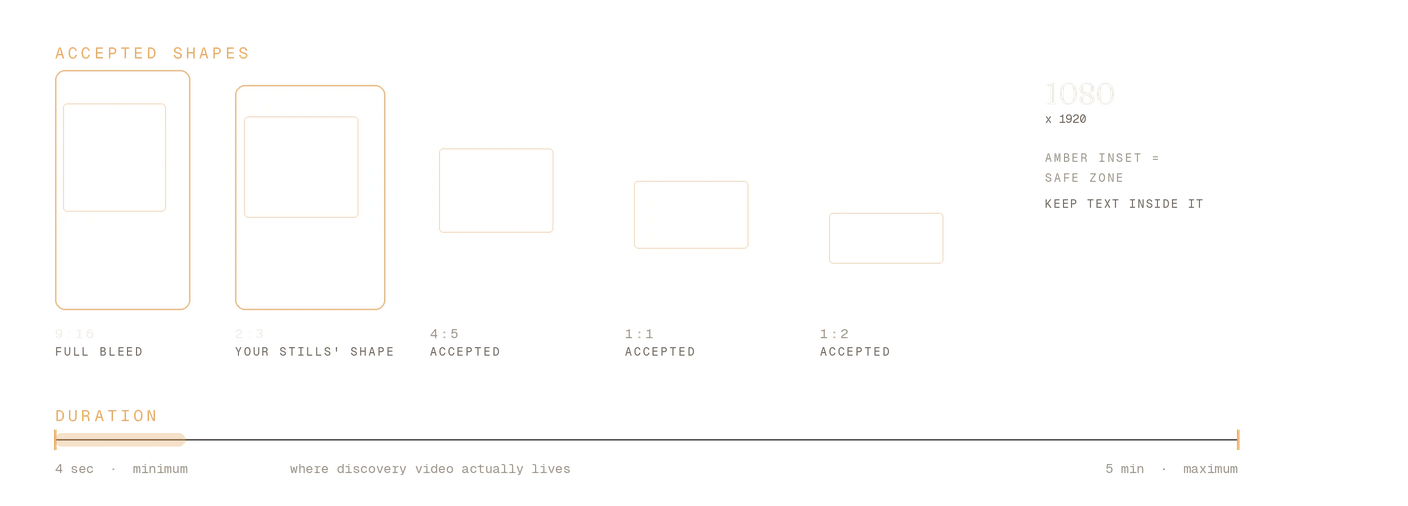
Length: four seconds minimum, five minutes maximum. The minimum is the one that catches people. A two-second loop exported from a design tool will be rejected, and that is the single most common reason an upload fails.
Aspect ratio
Aspect ratio: 9:16 if you want full-bleed. That's 1080×1920. Pinterest also accepts 1:1, 4:5, 3:4, 2:3 and 1:2. If you already make static pins at 2:3, your video can stay at 2:3 — you do not have to relearn a shape.
File type and safe zones
File type: MP4 or M4V on the web. On Android and iOS, MOV works too. Encode as H.264 or H.265; almost everything exports H.264 by default, so this rarely bites.
Safe zones: keep text inside 270px from the top, 790px from the bottom, 65px left and 195px right. Pinterest overlays its own interface on those edges. Text outside them gets covered by a save button on somebody's phone.
Title: 100 characters. Description: 800. Descriptions don't show in the home feed or search feed — they feed the algorithm rather than the reader, which is a reason to write them properly rather than a reason to skip them.
Get these right and the rest is craft.
Three ways to make one
1. In Pinterest itself
The free route, and the one nobody mentions because it isn't a tool you can sell. Click Create, choose Create Pin, upload the video, and Pinterest handles the rest — title, description, board, link, all in the same form as a static pin. On a phone you can record straight into it.
Use this when you already have footage: a clip of the product in your hand, a room you styled, a thing being unboxed. Real footage of a real thing outperforms most of what any tool will build for you, and it costs nothing.
The limit is that it's one pin at a time and you supply the video. There's no leverage in it.
2. A template tool
The Canva-style route, and what most "Pinterest video pin maker" tools mean by video. You pick a vertical template and the tool applies motion to images you already have — transitions between stills, a slow zoom on a photo, a headline sliding in, a call-to-action frame at the end.
This is well-established and it works. Pin Generator's own guide to video pins describes the job in exactly these terms: templates, transitions, zooms, slide-ins and animated text. It is motion applied over existing images rather than motion inside them.
Use this when you have good photography and want it presented with movement, or when you want a consistent branded shape across a lot of pins.
The limit is that the underlying images stay still. A slideshow of three product photos is more eye-catching than one product photo, but the product itself never does anything.
3. Generated motion from a product image
The newer route: instead of moving a still around the frame, the frame itself moves. Steam lifts off the coffee. Light travels across a room. The product sits still and the scene behaves like a scene.
This is what we built into Pinstark, and it's in beta. You paste a product link, get a pin pack — product images with editorial headlines already written for Pinterest search — and then turn any image in that pack into a video pin. The clips run about five seconds, which clears the four-second minimum, and the headline is burned in after the video renders, so the text sits correctly at 2:3 rather than being stretched out of a wider frame. A video costs twice what a pin pack costs, and it's available on every tier including the free one once you've connected a Pinterest account.
The practical difference is where the time goes. You aren't sourcing footage or arranging a template — the images already exist from the pack, so choosing which one moves takes seconds, and you can try several before committing.
Use this when you're pinning products you don't physically have, which is most affiliate work.
The limit is that it's generated, so it's product photography rather than a demonstration. It won't show a thing working. Some tools other than ours generate Pinterest video too — this is a category now, not a single product.
Which route fits
| What you supply | What moves | Best for | |
|---|---|---|---|
| Pinterest itself | Your own footage | Whatever you filmed | Products you physically have |
| Template tool | Your own images | The layout, over stills | Branded consistency at volume |
| Generated motion | A product link | The scene inside the frame | Products you've never held |
What actually makes a video pin work
Assume no sound. Most people browse Pinterest muted, and Pinterest is a search surface rather than a watch surface. If your video needs audio to make sense, it doesn't make sense. Put the message in text on screen.
Spend the first second on the point. Not a logo, not a fade-in. The first frame should already say what this is. People are scrolling a grid, and your video is competing with still images that communicate instantly.
It's a trailer, not the film. A video pin's job is to make someone click through to the page, not to satisfy them in the feed. Show enough that the destination is obvious and not so much that visiting is pointless.
Match the destination. A video promising a specific thing that links to a homepage is the fastest way to a high bounce rate. Send people to the exact page the video is about.
Don't retire your static pins. Video is an addition to the mix, not a replacement. Static pins still carry most of Pinterest, and a feed of nothing but video reads as a brand account rather than a useful one.
Mistakes that kill a video pin
Under four seconds. Covered above, but it's worth repeating because it's the one that produces an unexplained failure rather than a warning.
Horizontal video. A 16:9 clip repurposed from YouTube wastes most of a vertical feed slot. Pinterest will accept it up to a point; the feed will bury it.
Text in the safe zones. Your headline looks fine on a desktop preview and gets covered by interface on a phone, which is where most of the traffic is.
Motion for its own sake. Movement should reveal something — the product, a result, a transformation. Everything bouncing at once reads as an advert, and people scroll past adverts.
One video pin and a strategy declared. Pinterest rewards consistency over months. A single video pin tells you nothing about whether video works for your niche.
FAQ
How long should a Pinterest video pin be? Pinterest allows four seconds to five minutes. In practice, short wins on a discovery surface — long enough to make the point and get the click, not long enough to replace the page you're linking to.
What size should a Pinterest video be? 9:16 (1080×1920) for full-bleed. Pinterest also accepts 1:1, 4:5, 3:4, 2:3 and 1:2, so a 2:3 video sits comfortably alongside static pins made at the same shape.
How do I upload a video to Pinterest from my phone? Create, then Create Pin, then pick or record the video. Same flow as a static pin — add the title, description, board and destination link before you publish.
Can a video pin have a link? Yes. Video Pins take a destination URL exactly like static Pins, which is what makes them useful for affiliate and product work rather than just brand presence.
Do video pins get more reach than static pins? Not automatically. Motion earns attention in a grid of still images, but Pinterest is a search engine first — a video pin with a weak title and description will lose to a static pin with a strong one. Get the keyword research right before you worry about format.
Do I need a video tool at all? No. If you own footage of the thing you're pinning, Pinterest's own uploader is free and sufficient. Tools earn their keep when you're making many pins, or pinning products you don't have in front of you.
If you're pinning products you've never held: paste an Amazon, Etsy, Shopify or Walmart link into Pinstark and get a complete pin pack — product-true AI photography, editorial overlays, and an SEO title and description written for Pinterest search. Any image in the pack can then become a video pin, and you can publish straight to your boards.
Pinterest video Pin specifications verified from Pinterest's own Pin specs help page on September 15 2026 and subject to change — check help.pinterest.com for current details.